TSF Scholarship Application for the 2026 – 2027 School Year
Deadline: May 5, 2026
Obtaining Your FAFSA Submission Summary (FSS) Report
*** The FSS is ONLY available in the STUDENT’s FAFSA Account. You must have access to the student’s phone or email to access the verification code needed to log into the account ***
- Go to the FAFSA Student Aid website: https://studentaid.gov/h/apply-for-aid/fafsa
- Choose Edit a 2026–27 FAFSA® Form
- Log in with the STUDENT’s user credentials and go through all of the verification steps
- Once logged in, under My Activity, the 2026-2027 FAFSA Form must say Processed. If it doesn’t, you must wait until it does so before clicking on the Form to continue
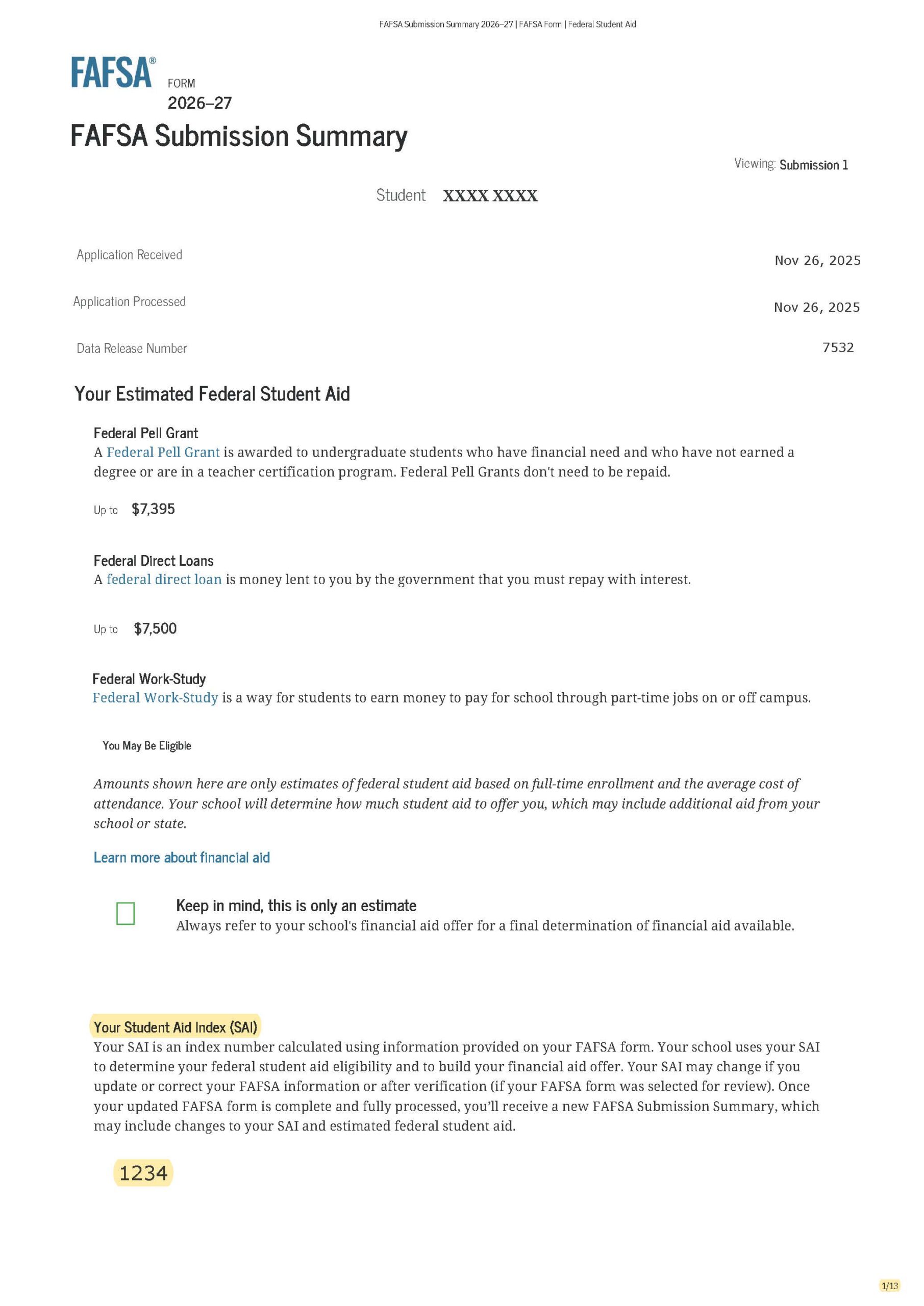
- Look for the FAFSA Submission Summary is Ready! Notice and click on the button FAFSA Submission Summary
- At the top right of the page, select Print FAFSA Submission Summary.
- In the print dialog, instead of printing, choose the SAVE AS PDF option. Choose Portrait mode and save ALL pages.
- Save the PDF file with a filename that includes your Last, then First name.
The first page of a sample FASA Submission Summary report is displayed below.